In order for users to have access to the Merchandiser Studio app in Tweak, they will first be required to be Tweak Super-Users.
In Merchandiser Studio, we’ve defined three roles with different permissions and access: Admin, Manager and Editor.
Admin has access and rights to all the parts of the app, being able to define settings for Smart Overlay, Mandatory Product Data and Inviting new Users. By default, the owner of the Tweak account is the Admin on the Shopify Store.
Only Admins are allowed to invite other Admins:

Editors can make changes to Product data and images. When these changes are saved, the Products become Unsynced. These Unsynced changes will need to be synced by a Manager or Admin.
Editors can create Campaigns and save them to Draft mode but are not allowed to Sync products to Shopify, Publish or Schedule Campaigns.
Managers have all the functionality of Editors but can sync products with Shopify Stores and publish or schedule a Campaign.
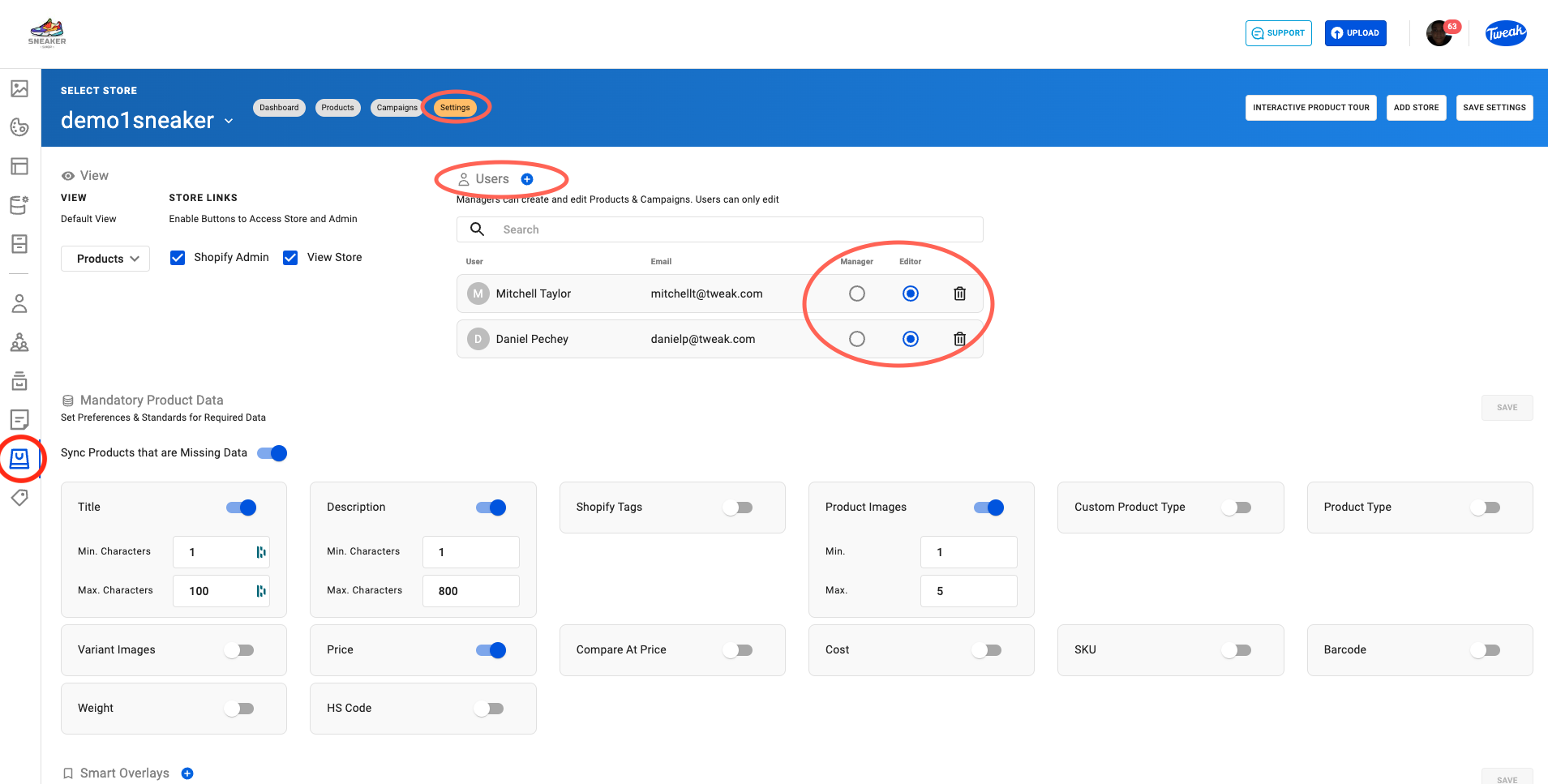
Only Admins are allowed to invite Managers and Editors.
To invite Managers and Editors:
1. Click on the Bag icon on the bottom left of the page.
2. Click on Settings at the top of the page,
3. Click on the + Users and select the User you wish to invite.
4. Define the role required, selecting either Editor or Manager.