
Mandatory Metadata on Tweak ensures essential information is provided for each asset, improving searchability and data consistency. It prompts users to fill in required fields like title, description, and tags during asset upload, enabling efficient asset management and collaboration. By enforcing standardized information, it enhances organization and filtering capabilities, optimizing workflow efficiency on the Tweak platform.
When uploading assets, users are prompted to fill in mandatory metadata fields. These fields capture vital details such as title, description, tags, and other relevant information specific to your organization's requirements. By making these fields mandatory, Tweak ensures that no asset can be uploaded without essential metadata.
In summary, mandatory metadata on Tweak ensures that important information is consistently provided for each asset and templates, leading to improved searchability, data integrity, and collaboration. By adhering to mandatory metadata requirements, users can optimize their asset management processes and maximize the benefits of the Tweak platform.
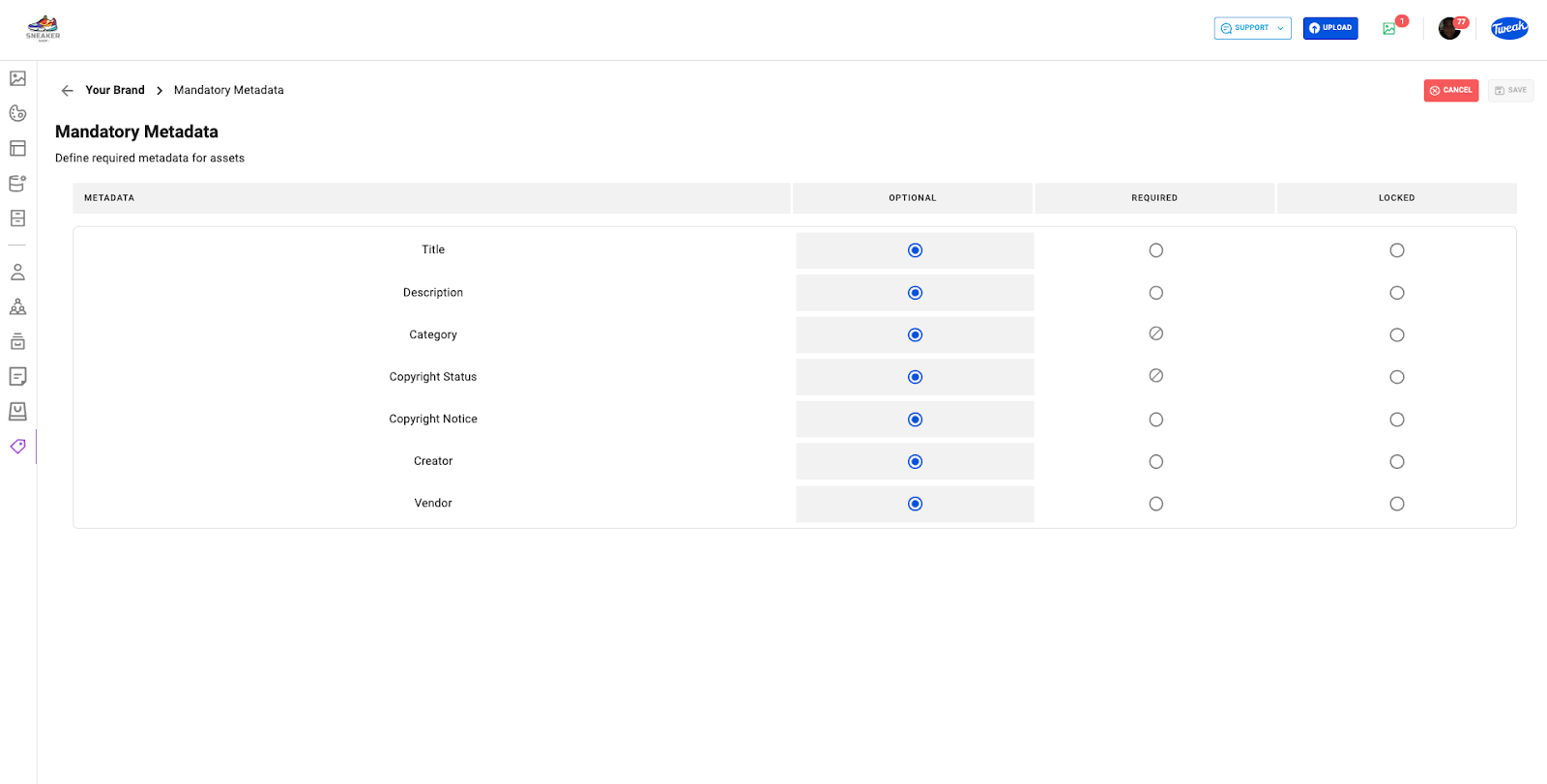
1- Click on the Tag Icon(Your Brand) on the left panel.
2- All brand preferences and settings will be displayed.
3- Click on Mandatory Metadata.
4- To define Mandatory Metadata select the option Required for the required Metadata.
5- Define Locked if you don’t wan’t the metadata to be open to accept new values.
6- Make sure changes are Saved.







