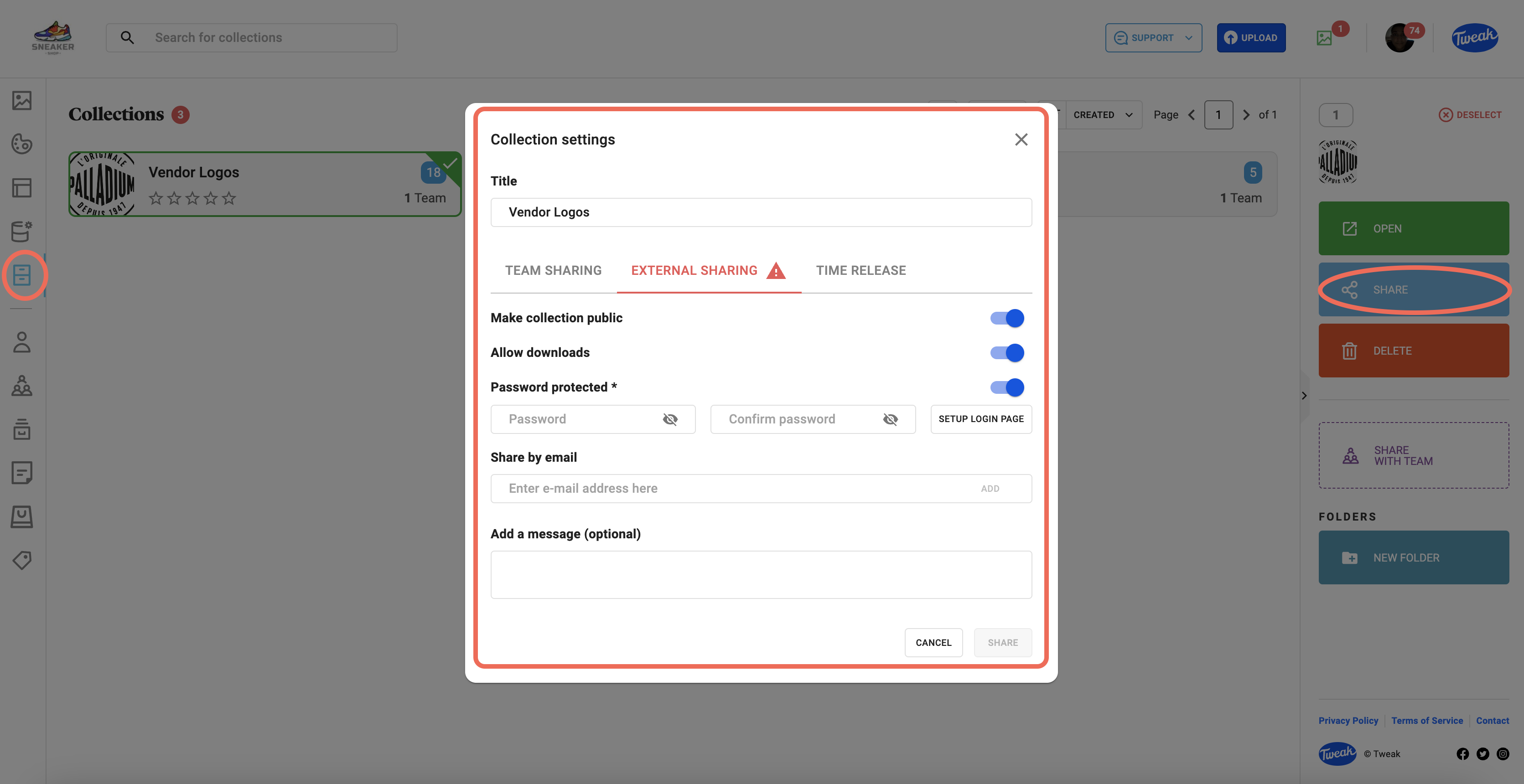
It’s possible to share Collections internally with your Tweak users or to share publicly or both.
1- Click on the (Collection icon) tab on the left panel
2- You’ll be presented with all the Collections available. Double click on the Collection you wish to set time-release and expiry on.
3- Click on the (share icon) on the top right and you’ll have the option to edit. Team Sharing, External Sharing & Time Release. Click on External Sharing.
4- Turn on the toggle, Make Collection Public.
5- Turn on Allow Downloads if that is your preference
6- Click on Copy the Public Link to your Collection
7- Turn on Password Protection (optional) and select a password.
8- If you’ve chosen Password Protection, you’ll have the option of choosing and customizing a login page by clicking on Setup Login Page. On the login page setup you can type a headline, Color, Logo Image & Image (from within Tweak). When you’ve made your selections, click Save. You’ll get the notification Custom Collection Login Updated
9- There’a another option to share a Collection – Share by Email. Enter emails individually, followed by clicking Add. Add a message for the recipient and click Share, followed by Close. A green confirmation will follow.